
All features
Here is what DispoJet does today, topic by topic. Each feature links to the section of the user guide (in French) that explains it step by step.
Calendars and video calls
Only your truly free times are offered, and each meeting lands in your calendar with its video link.
Google Calendar and Google Meet
All plans
Your busy times are read in real time; every meeting creates its event and its Meet link.
Read the guideOutlook / Microsoft 365 and Teams
All plans
Connect one or more Microsoft calendars: meetings are created there with their Teams link.
Read the guidePhone or in person
All plans
You call the lead, they call you, or you meet in person — or let the lead choose.
Read the guidePublic holidays and cancellation deadline
All plans
Add public holidays in one click (France, Belgium, Luxembourg, Switzerland) and set a deadline to cancel or reschedule.
Read the guideTime zones
All plans
Leads see available times in their own local time, wherever they are.
Read the guideBooking page and form
A clear page on desktop and mobile, in your lead's language and in your brand colors.
French, English, Spanish
All plans
The app, the booking page, emails, and reminders are available in all three languages.
Read the guideForms that route or screen out leads
Pro and Sales Team
Based on their answers, leads are sent to the right closer or meeting type, or politely screened out. You choose when they give their contact details: first, after picking a time, or at the end.
Read the guideYour colors and logo
Pro and Sales Team
A booking page that matches your brand, without the DispoJet mention.
Read the guideYour own domain
Pro and Sales Team
Your pages on your own address, for example meet.your-site.com: your leads never see dispojet.com.
Booking on your website
Pro and Sales Team
Link, inline calendar, popup, or floating button, plus the page of your choice after booking.
Read the guideSingle-use links and polls
Pro and Sales Team
A link that works once for one specific person, or a poll to find the date that suits everyone.
Read the guideBlocked email addresses
All plans
Disposable addresses and mistyped domains are rejected at booking.
Read the guideReminders and messages
Fewer no-shows thanks to confirmations, reminders, and follow-ups sent automatically.
Confirmations and reminders
All plans
Confirmation email with the video link and a link to reschedule or cancel, then reminders the day before, 1 hour before, and at start time.
Read the guideAutomated messages
Pro and Sales Team
Day-before reminder, one hour before, thank-you after the call, follow-up after a cancellation or a no-show: you write them.
Read the guideWhatsApp and SMS templates
Pro and Sales Team
From the meeting card, one click opens WhatsApp or SMS with your message already filled in: you just hit send. Automatic reminders go out by email.
Read the guideSend from your Gmail or your domain
Pro and Sales Team
Emails go out from your own address instead of DispoJet's.
Read the guideAutomated SMS
Sales Team
Your automated messages also go out by SMS, through your own Twilio or Brevo account.
Read the guideAds, payments, and group sessions
Measure your ads, get paid at booking, and fill your masterclasses.
Facebook pixel and Conversions API
Pro and Sales Team
Every booking is sent to Meta, from the server too; a sale marked “Closed” is sent as well.
Read the guidePayment at booking (Stripe)
Pro and Sales Team
Full price or deposit, paid into your own Stripe account, with automatic refunds based on your rule.
Read the guideMasterclasses and waitlist
Pro and Sales Team
Sessions with several seats; when full, the next people join a waitlist and take freed-up seats.
Read the guideRecurring meetings
Pro and Sales Team
A series of weekly or monthly sessions, always with the same person.
Read the guideTeams of closers
Share meetings among your closers without spreadsheets or manual juggling.
Round robin
Sales Team
Distribution by priority and weight; the same closer for a returning lead; no-shows don't count against anyone.
Read the guideTeams and managers
Sales Team
Group your closers into teams; a manager sees their members' meetings and can transfer them.
Read the guideTime off and caps
Sales Team
A closer on time off gets no new meetings, and meetings already booked go to a free colleague; daily and weekly caps.
Read the guideMeeting transfers
Sales Team
Hand one or more meetings to a colleague; the lead receives the new link.
Read the guideSales tracking and stats
Know who shows up, who buys, and which source brings the best meetings.
Contact card and attendance
All plans
Call, WhatsApp, notes, the person's history; mark Showed or No-show in one click.
Read the guideCall outcome and tags
Sales Team
Closed (with the amount), not closed, or follow up; tags keep track of where the lead came from.
Read the guideStats, report, and Excel export
Sales Team
By closer, by meeting type, by tag, and by source (utm_source); sales report and export.
Read the guideArtificial intelligence
Your AI analyzes your leads' profiles and your closers' results, then sends each lead to the closer who sells best to that profile.
Claude or ChatGPT connected to your sales
Pro and Sales Team
Ask questions like you would an analyst: “Which profile does Cedric sell best to, and where are his results weaker?”, “Which product works with big budgets?”. Your AI reads meetings, answers, outcomes and calls, without changing anything. Requires your own Claude or ChatGPT subscription (not included).
Smart routing by profile
Sales Team
Based on the form answers, the lead goes to the closer with the best results on that profile, when history proves it. Otherwise normal round robin decides.
Call prep and lead score
Pro and Sales Team
Before the call: their profile, likely objections, questions to ask and their chances of closing out of 100. Uses your Claude or OpenAI API key, billed by them per use.
Recorded call debrief
Pro and Sales Team
After the Fathom call: suggested outcome, reasons, next step and a follow-up message ready to send.
Monday report
Sales Team
Every Monday by email: the week's numbers, closers, winning profiles and your AI's analysis with 3 actions.
Integrations
DispoJet connects to your tools and imports your settings from Calendly.
One-click import from Calendly
Pro and Sales Team
Event types, questions, hours, and meetings imported; kept in sync during the switch. Other tools: AI-assisted import.
Read the guideHubSpot
Pro and Sales Team
Every meeting creates or updates the contact and opens a deal.
Read the guideAPI, webhooks, and UpTrainer CRM
Sales Team
Notify Make, Zapier, n8n, or your CRM on every event; read and manage your meetings through the API.
Read the guideData and security
Simple tools to comply with GDPR and protect your account.
GDPR: export, erasure, retention
All plans
Export or erase a person's data and set a retention period; a data processing agreement (DPA) is available.
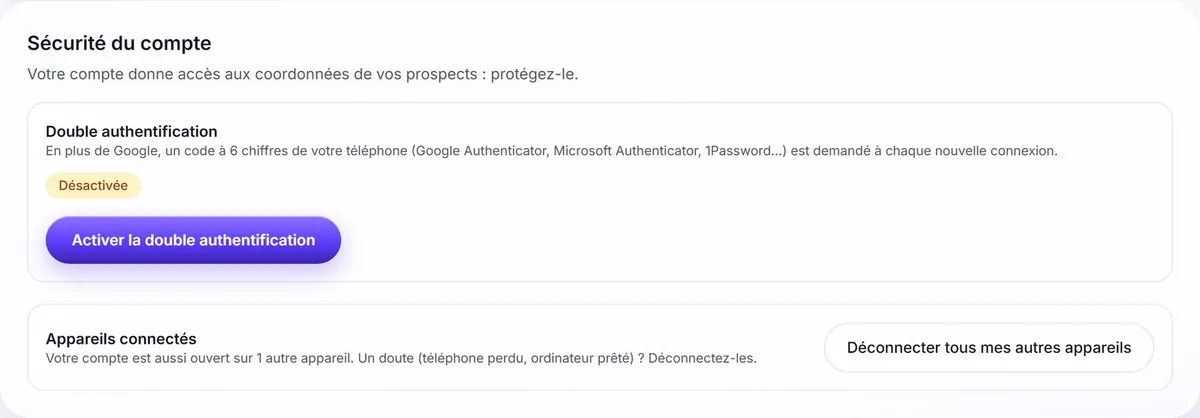
Read the guideTwo-factor authentication
All plans
A code from an authenticator app at each new sign-in, with backup codes.
Read the guideHosted in France
All plans
OVHcloud server located in France, HTTPS connections, encrypted backups.
App on your phone
All plans
Install DispoJet on your home screen, without an app store, and get its notifications.
Read the guideYour next meeting deserves more than a plain calendar
Create your account in a minute with Google or your email. The free plan has no time limit.